All posts
Channel Management May 12, 2026 6 min read
OTA Rate Parity Without the Pain
Why most parity violations come from rate plan logic, not from being undercut — and how to fix them in 20 minutes a week.
LP
Lena Petrova · Head of ProductWhy most parity violations come from rate plan logic, not from being undercut — and how to fix them in 20 minutes a week.
Every revenue manager has had this call: a contracting OTA flags a parity violation. You scramble through extranets, comparing rates city by city, plan by plan. Half the time you can't even reproduce the screenshot they sent.
Here's the uncomfortable truth: in the typical PMS dataset, only around 18% of parity flags trace back to an OTA actually discounting your rate. The other 82% come from misconfigured rate plans on your side.
That ratio matters because it changes where you spend your attention. If you believe parity is an enforcement problem, you spend your week writing emails to account managers. If you accept that it's mostly a configuration problem, you spend twenty minutes auditing your own rate plans and the flags stop arriving. This piece is about the second approach.
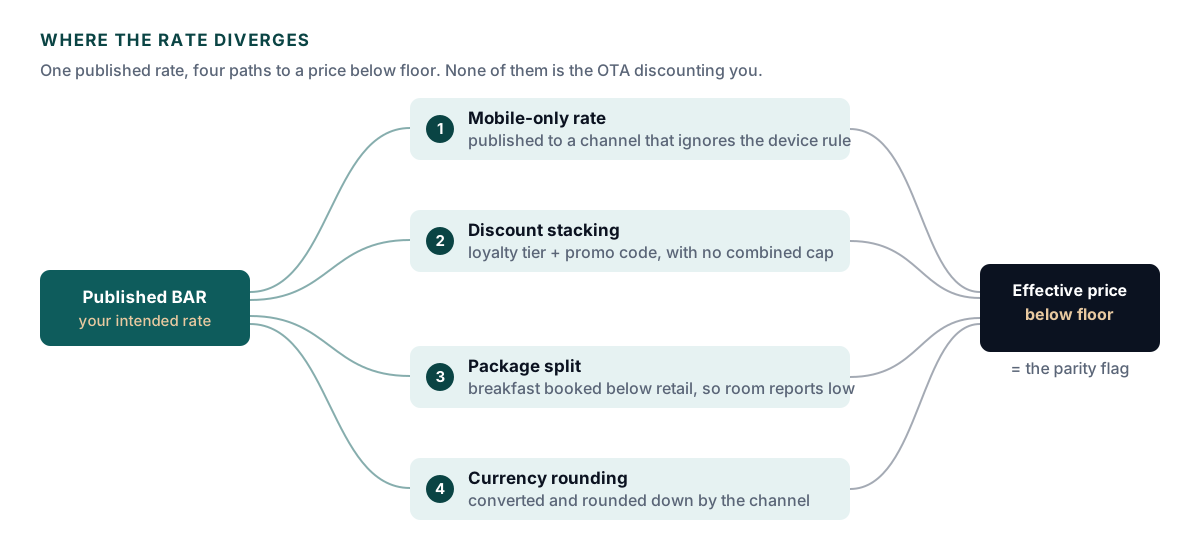
Each of these is worth understanding in its own right, because the fix is different in every case and applying the wrong one leaves the leak open.
Mobile-only rates are the most common. You create a 10% mobile discount to push app bookings, publish it to a channel that supports device-targeted rates, and forget that a second channel ingests the same rate plan without honoring the device restriction. The discount that was meant for one audience becomes your public rate on another site. The fix is not to delete the rate — it's to close the rate plan to every channel that can't enforce the restriction.
Discount stacking is the sneakiest, because each individual rule is correct. A 5% loyalty tier is reasonable. A 10% winter promo code is reasonable. Nobody wrote down that they should never combine, so a member with a promo code sees 15% off and your parity monitor sees a rate no OTA can match. Stacking rules need an explicit cap, and the cap belongs on the rate plan, not in a policy document.
Package undervaluation is an accounting problem wearing a parity costume. When you sell a room-plus-breakfast package for 6,000 and book breakfast internally at 200, the room component reports as 5,800 — below your BAR of 6,000. Nothing was discounted; the split was wrong. Price the non-room components at their real retail value and the room line comes back above floor.
Currency rounding is the one that generates flags nobody can reproduce. You set a rate in INR. An OTA converts to GBP at its own FX rate, on its own schedule, rounding down to a clean price point. Your parity tool checks in a third currency at a fourth timestamp. Everyone is behaving correctly and the numbers still disagree by pocket change. This one you manage with a floor buffer, not a fix.
We thought we had a Booking.com problem. We had a rate plan problem.
Before you act on any flag, understand what the evidence actually shows. A screenshot from an OTA account manager captures one moment, one currency, one device, one logged-in state, and one point of sale. Change any of those five variables and the price legitimately changes.
None of this means the flag is wrong. It means the flag is a hypothesis. Treat it as a pointer to a rate plan worth auditing rather than a verdict to be answered.
The goal is a check you run against your own data before anyone else runs one against you. It needs three inputs: every active rate plan, the channels each one publishes to, and the effective net price after every discount rule that can apply.
That third input is where most in-house checks fall down. Comparing published BAR across channels tells you almost nothing, because the leaks all happen after the published rate — in stacking, in packaging, in conversion. You need the price a real guest would actually pay at checkout, computed the way the booking engine computes it.
Once you can compute that number, the check itself is trivial: for each rate plan and each channel, is the effective net price below your floor for that channel? Sort the answers by violation count and you have your work queue for the week.
Pull your rate parity dashboard. Sort by violation count descending. For each rate plan in the top five, ask three questions: which channels does it publish to, what discounts can stack on it, and what's the floor price in each currency?
Work strictly top-down and stop at five. Parity violations follow a steep distribution — the top few rate plans usually account for the large majority of flags, and the tail is mostly rounding noise. Fixing five plans a week beats auditing forty once a quarter, because the fixes compound and the tail shrinks on its own.
Nine times out of ten, the fix is closing a rate plan to one channel, capping a stack rule, or adjusting currency rounding. The tenth time, it's a real OTA violation — and that's the one worth escalating.
When you have genuinely been undercut, the quality of your escalation determines how fast it gets resolved. Account managers field parity complaints constantly, and most arrive as a screenshot and an accusation. Yours should arrive as a case file.
That last item is the one people forget, and it is the one that ends the argument fastest. If you can show the rate has been stable for two weeks, a cache explanation is off the table.
Parity work has a reputation as a grind because most teams do it reactively, one screenshot at a time, in the least favorable position — defending a number they can't reproduce. Run the drill instead. Twenty minutes a week against your own configuration turns parity from an argument you keep having into a report you occasionally read.
Book a 30-minute demo. We'll walk through your specific property type, room count, and channel mix, then show you exactly what your data looks like on StaySynq.
Early access · founder-led onboarding · launch pricing locked through year one